


Feature Flags and Controlled Rollouts: How Gaming Apps Test New Features Safely in 2026
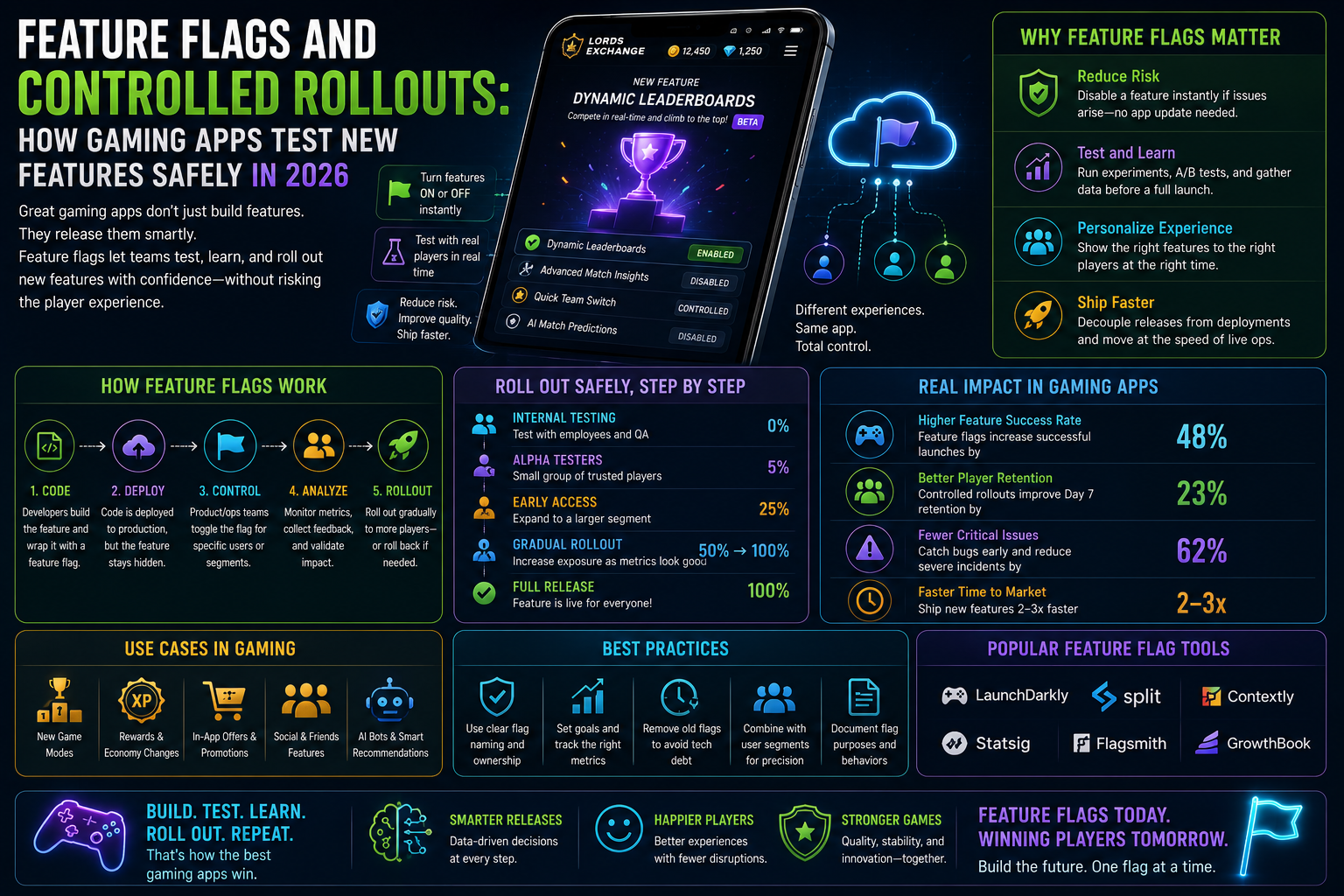
When the lord exchange app adds a major new feature — a new contest format, an enhanced analytics tool, a redesigned team selection interface — the engineering team does not simply enable that feature for all 10 million players simultaneously and hope it works. Simultaneous deployment at full scale transforms every unknown bug from a small problem into a platform-wide incident.
Modern mobile app engineering uses feature flags and controlled rollouts to deploy new capabilities gradually — first to a small percentage of users, monitoring outcomes, expanding coverage only when confidence is established. This approach makes apps more reliable, allows rapid rollback when problems appear, and enables personalised feature experiences for different user segments. Understanding how this works demystifies the release experience and explains why you sometimes see features that friends on the same platform have not seen yet.
What Feature Flags Are
A feature flag (also called a feature toggle or feature switch) is a conditional code branch that controls whether a specific feature is active for a specific user or group. At the simplest level:
```
if (featureFlag("new_team_selection_ui")) {
showNewTeamSelectionUI();
} else {
showCurrentTeamSelectionUI();
}
```
The value of the feature flag is controlled by a remote configuration system — not hard-coded in the app itself. This means the engineering team can change which features are enabled for which users without deploying a new app version. A feature can be enabled for 1% of users, 10%, 50%, or 100% through a configuration change that takes effect immediately, without waiting for the app to be updated and approved by App Store or Google Play.
Feature flags enable several powerful engineering capabilities:
Gradual rollout: Enable a new feature for 1% of users, monitor outcomes, expand to 5%, 10%, 25%, 50%, 100% as confidence grows. If a problem appears at any stage, reduce the flag percentage immediately.
A/B testing: Show Version A to 50% of users and Version B to the other 50%. Compare outcomes on defined metrics to determine which version performs better.
Kill switch: If a new feature produces unexpected problems, setting its flag to 0% immediately disables it for all users — no app update required.
Beta groups: Enable new features for specific user segments (e.g., users who have opted into beta testing, or users in specific geographic regions) before general availability.
Gradual sunset: Disable old features gradually as new features mature, reducing the abrupt experience change of immediate feature removal.
How Lord Exchange App Uses Feature Flags
Lords exchange's feature flag system, built on a real-time configuration service, manages hundreds of feature flags simultaneously across the entire platform.
New feature rollouts: When a significant new feature (like the stadium companion mode or the smartwatch integration described in earlier guides) is ready for production, it is deployed to all users' app code but initially enabled only for 0% of users. The rollout flag is then gradually increased over a period of days or weeks:
Day 1: 1% of users — catching any critical issues before significant scale
Day 3: 5% — validating stability under slightly higher load
Day 7: 25% — observing user adoption patterns and support contact rates
Day 14: 100% — full deployment after confidence is established
Analytics tracking at each rollout stage: At every stage, lords exchange monitors key quality metrics for the expanding user group — crash rate, session length, support contact rate, feature adoption rate — comparing them against the control group (users not yet receiving the feature). Metrics that deteriorate trigger rollout pause and investigation.
Personal feature flags: Some feature flag values are determined by user characteristics rather than random assignment. Premium subscribers may receive new analytics features before standard users. Verified users with established account history may receive new financial features before new accounts.
Why You Sometimes See Features Before Your Friends Do
This feature flag architecture explains the occasional "but I don't have that feature" conversation between lords exchange users. If you are in the 25% of users currently receiving a new feature's flag, you have access to it; your friends who are in the remaining 75% do not yet. This is not an error — it is the controlled rollout working as intended.
Features that are in partial rollout typically become available to all users within 2-4 weeks of initial deployment. If you see a feature mentioned in lords exchange's community or update notes that you do not have access to yet, it is likely in gradual rollout and will appear for you soon.
Feature Flag Best Practices That Protect Player Experience
Decoupled deployment and activation: The code for a new feature is deployed to all app users in an update, but the feature is not activated (flag is 0%) until the engineering team deliberately enables it. This decoupling means the app update includes the feature without making it available — the flag controls availability separately from code deployment.
Gradual rollout with monitoring gates: Advancement from one rollout percentage to the next is gated by monitoring outcomes — the rollout only advances when the previous stage has run long enough to assess quality metrics confidently. Rushing to 100% deployment without monitoring gates is an engineering anti-pattern that lords exchange explicitly avoids.
Instant rollback capability: Feature flags can be set to 0% instantly — without an app update, without store review, without any player action. This instant rollback capability is the most important safety property of feature flag architecture, transforming potential full-platform incidents into small-scale problems contained and resolved quickly.
Shadow mode testing: Some new features run in "shadow mode" — performing their calculations and generating outputs that are logged but not shown to users — before enabling them for any actual users. Shadow mode testing validates that the feature's backend logic produces correct outputs on real production data before any player sees the results.
Frequently Asked Questions
Why does the lord exchange app sometimes look different on different devices?
Different devices may be in different feature flag rollout groups, producing different interface experiences. This is intentional — the rollout is testing whether the experience works well on different device categories before full deployment.
Can I opt in to receive new features before they are widely available?
Lords exchange's beta testing program, available through Account Settings > Beta Features, enrolls opted-in players in early access rollout groups. Beta testers receive new features at the early rollout stages (1-5% groups) rather than waiting for full deployment.
If I see a bug in a newly released feature, how do I report it?
Report bugs through Settings > Feedback, specifically mentioning the feature name and a description of what happened. Include the app version number visible in Settings > About. Bug reports from the active rollout population are high-priority for the team actively monitoring that feature's deployment.
Does feature flag rollout affect all app versions simultaneously?
Feature flags are applied at the account level, not the app version level. Users on the same app version may have different feature flag values based on their rollout group assignment. If you have not updated the app in some time, very new features may require a minimum app version that your current version does not meet — these version gates are separate from the rollout percentage.
Conclusion
Feature flags and controlled rollouts are the engineering discipline that allows lords exchange admin to continuously deploy new capabilities without risking the stability that players depend on. Every new feature players eventually enjoy — every analytics tool, every community feature, every UX improvement — arrived through a gradual rollout that validated its quality before full deployment. The occasional experience of "my friend has that feature and I don't" is the visible edge of this safety discipline working as intended — evidence that lords exchange prioritises reliability over the appearance of simultaneous capability deployment. Players who understand this process appreciate it as evidence of engineering care rather than inconsistency, and those who want early access can engage with the beta testing program to be in the first groups for every new capability that arrives.
- Technology for Students
- Admissions & Applications
- Online Courses
- Career and Jobs
- Campus Life
- Drinks
- Film
- Fitness
- Food
- Spellen
- Gardening
- Health
- Home
- Literature
- Music
- Networking For Students
- Insights
- Party
- Religion
- Shopping
- Sports
- Theater
- Wellness
- Education News
- Business & Finance For Students
- Security, Law & Crime Education
- Insurance
- Science & Technology For Students
 Dutch
Dutch
 English
 Arabic
 French
 Spanish
 Portuguese
 Deutsch
 Turkish
 Italiano
 Russian
 Romaian
 Portuguese (Brazil)
 Greek
Greek