


What Is the Best Barcode Printing Setup for a New Warehouse?
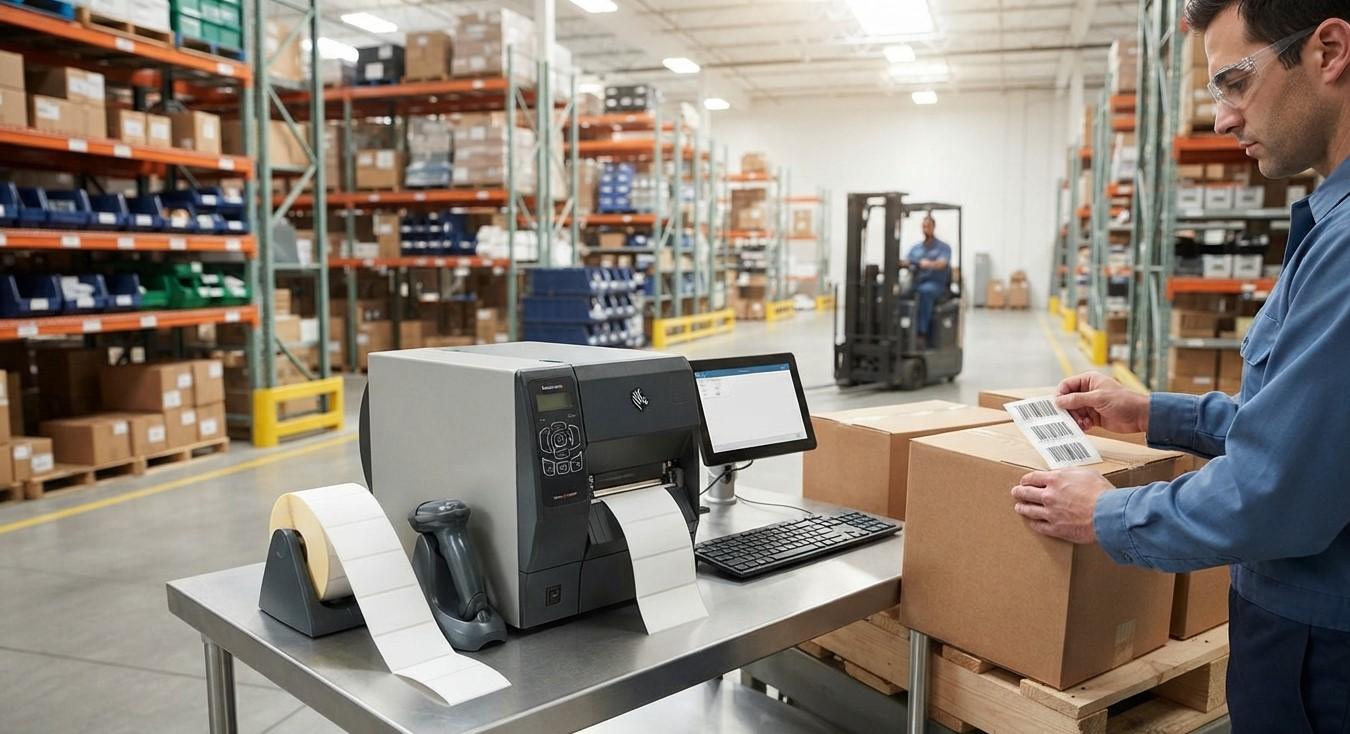
Setting up a new warehouse requires careful planning, especially when it comes to inventory identification, product labeling, receiving, picking, packing, and shipping. A reliable barcode printing setup can help warehouse teams label products accurately, reduce manual data entry, and improve overall operational efficiency.
For a new warehouse, choosing the right printer, labels, ribbons, software, and scanning equipment is essential. The goal is not simply to purchase a barcode printer but to create a complete printing system that can handle the warehouse's current requirements while allowing room for future growth.
Pointus Solutions provides Shop barcode and printing solutions that can help businesses establish efficient warehouse identification systems. From barcode printers and labels to scanners and other Printing Products, selecting the right equipment can make everyday warehouse operations more organized and reliable.
This guide explains what a new warehouse should consider when building the right barcode printing setup.
Table of Contents
- Why Does a New Warehouse Need Barcode Printing?
- What Should a Warehouse Barcode Printing Setup Include?
- Choosing the Right Barcode Printer
- Direct Thermal vs. Thermal Transfer Printing
- Choosing the Right Barcode Labels
- Selecting Barcode Ribbons
- Choosing the Right Barcode Size
- Barcode Printing Software and Integration
- Barcode Scanners and Mobile Devices
- How Much Printing Capacity Does a Warehouse Need?
- Where Should Barcode Printers Be Installed?
- How to Create an Efficient Warehouse Barcode Workflow
- Common Mistakes to Avoid
- FAQs
- Conclusion and CTA
Why Does a New Warehouse Need Barcode Printing?
A warehouse handles a large amount of product and inventory information every day. Without an organized identification system, employees may rely on manual product numbers, handwritten labels, spreadsheets, or visual identification.
Barcode printing provides a standardized way to identify products, cartons, pallets, storage locations, and other warehouse items.
A barcode-based system can help with:
- Product identification
- Inventory receiving
- Put-away operations
- Stock counting
- Order picking
- Packing
- Shipping
- Returns processing
- Location tracking
- Asset identification
When barcodes are printed clearly and consistently, warehouse employees can scan information instead of entering it manually. This can reduce errors and speed up routine processes.
What Should a Warehouse Barcode Printing Setup Include?
A complete warehouse barcode printing setup normally includes several components.
1. Barcode Printer
The printer produces the labels used throughout the warehouse. The correct printer depends on printing volume, label size, environment, and application.
2. Barcode Labels
Labels contain the barcode and any additional information required by the warehouse, such as product codes, descriptions, quantities, or storage locations.
3. Barcode Ribbons
Thermal transfer printers require ribbons to transfer the barcode image onto compatible label materials.
4. Barcode Printing Software
Software is used to design labels and connect barcode information with inventory or warehouse management systems.
5. Barcode Scanners
Scanners allow employees to read the printed barcodes during receiving, storage, picking, packing, and shipping.
6. Network or Connectivity
Depending on the warehouse setup, printers may connect through USB, Ethernet, Wi-Fi, or other supported connectivity options.
The best setup combines these components rather than selecting each item independently.
Choosing the Right Barcode Printer
The barcode printer is one of the most important parts of the system.
Before selecting a printer, consider the following factors.
Printing Volume
Estimate how many labels the warehouse will print each day, week, and month.
A small warehouse with limited printing requirements may only need a compact desktop printer.
A large distribution center with continuous printing requirements may require a more robust industrial printer.
Print Speed
If employees frequently wait for labels, slow printing can create bottlenecks.
Choose a printer with a print speed appropriate for your workflow.
Print Resolution
Print resolution is particularly important when printing small barcodes or labels containing detailed information.
Common resolutions include 203 dpi, 300 dpi, and higher options.
Connectivity
Consider how the printer will communicate with computers and warehouse systems.
Depending on your setup, Ethernet, USB, Wi-Fi, or other connectivity options may be useful.
Durability
Industrial warehouse environments can be demanding. If the printer will operate for long periods or in dusty or busy areas, a durable printer may be more appropriate than a basic office-style device.
Direct Thermal vs. Thermal Transfer Printing
One of the first decisions when establishing a warehouse printing system is choosing between direct thermal and thermal transfer printing.
Direct Thermal Printing
Direct thermal printing creates an image by applying heat directly to specially coated labels.
It does not require a ribbon.
Direct thermal can be suitable for applications such as:
- Shipping labels
- Temporary labels
- Short-term warehouse identification
- Receipts and similar applications
However, direct thermal labels may be more sensitive to heat, sunlight, and other environmental conditions.
Thermal Transfer Printing
Thermal transfer printing uses a ribbon to transfer ink onto the label material.
It can provide greater durability and is often suitable for labels that need to remain readable for longer periods.
Thermal transfer may be preferable for:
- Product identification
- Asset labels
- Long-term inventory labels
- Industrial applications
- Durable warehouse labeling
The right technology depends on how long labels need to remain readable and the environment in which they will be used.
Choosing the Right Barcode Labels
The printer is only part of the equation. The label material also needs to match the application.
Consider:
- Label size
- Material
- Adhesive
- Surface type
- Temperature
- Moisture
- Exposure to chemicals
- Expected label lifespan
For example, labels used on cardboard cartons may have different requirements from labels attached to plastic containers, metal equipment, or products stored in cold environments.
The adhesive should also be appropriate for the surface.
Using the wrong label can lead to peeling, fading, smudging, or scanning problems.
Selecting Barcode Ribbons
If the warehouse uses thermal transfer printing, the ribbon must be compatible with both the printer and label material.
Different applications may require different ribbon types.
When selecting ribbons, consider:
- Printer compatibility
- Label material
- Required durability
- Print quality
- Environmental conditions
- Printing volume
A suitable ribbon helps produce sharp, readable barcodes and can improve consistency across large printing jobs.
Businesses can explore appropriate Printing Products based on their specific warehouse requirements.
Choosing the Right Barcode Size
Barcode size should be determined by the information being encoded, the available label space, and the scanning environment.
A barcode should be large enough to scan reliably while still fitting comfortably on the product, carton, pallet, or storage location.
Consider:
- Product dimensions
- Label dimensions
- Scanning distance
- Barcode type
- Printer resolution
- Required human-readable information
Avoid making barcodes unnecessarily small simply to save label space. A barcode that is difficult to scan can slow down warehouse operations.
Barcode Printing Software and Integration
A warehouse should ideally connect barcode printing with its inventory or warehouse management software.
Instead of manually typing every barcode value, the system can automatically retrieve information from the warehouse database.
For example, when a product is received, the system could generate a label containing:
- Product name
- SKU
- Barcode
- Quantity
- Batch number
- Lot number
- Location
- Other relevant information
Integration can reduce repetitive data entry and improve consistency.
Before purchasing equipment, verify that the printer and label software are compatible with the warehouse management system or ERP platform being used.
Barcode Scanners and Mobile Devices
A barcode printing setup works best when it is connected to a scanning workflow.
Warehouse employees can use handheld scanners or mobile computers to scan labels during different processes.
Common scanning points include:
Receiving
Employees scan incoming products and verify quantities against purchase or receiving records.
Put-Away
Products can be scanned when moved to their assigned storage locations.
Picking
Workers scan products during order picking to confirm they have selected the correct items.
Packing
Products and cartons can be scanned before orders are finalized.
Shipping
Shipping labels and product information can be verified before goods leave the warehouse.
The combination of accurate printing and reliable scanning creates a more connected warehouse workflow.
How Much Printing Capacity Does a Warehouse Need?
A new warehouse should estimate its expected label volume before purchasing equipment.
Ask questions such as:
- How many products will be received each day?
- How many orders will be processed?
- How many labels are required per order?
- Will products require individual labels?
- Will cartons and pallets also require labels?
- Will storage locations need barcode labels?
- How much will the warehouse grow over the next few years?
For example, a small warehouse may only need one desktop printer.
A growing warehouse might benefit from multiple printers positioned at receiving, packing, and shipping stations.
A high-volume operation may require industrial printers capable of continuous printing.
Planning for future growth can prevent the need for an immediate equipment upgrade.
Where Should Barcode Printers Be Installed?
Printer placement can have a significant impact on workflow efficiency.
Common locations include:
Receiving Area
A printer near receiving allows employees to print labels as products arrive.
Warehouse Floor
A printer positioned close to inventory storage can be useful when labels need to be generated during stock operations.
Packing Stations
Printers near packing areas allow employees to produce shipping or carton labels without leaving their workstation.
Shipping Area
A dedicated printer can support high-volume shipping label production.
The best layout depends on warehouse size and workflow. Printers should be positioned where employees can access them without unnecessary movement.
How to Create an Efficient Warehouse Barcode Workflow
A successful setup should follow a clear process.
Step 1: Identify Label Requirements
Determine which products, cartons, pallets, shelves, bins, and assets need barcodes.
Step 2: Estimate Printing Volume
Calculate expected daily and monthly label requirements.
Step 3: Select the Printing Technology
Choose direct thermal or thermal transfer based on durability and application requirements.
Step 4: Select Printers
Choose printers based on volume, speed, resolution, connectivity, and operating environment.
Step 5: Select Labels and Ribbons
Match label materials and ribbons to the printer and application.
Step 6: Integrate Software
Connect printing with inventory, warehouse, ERP, or order management systems where appropriate.
Step 7: Add Scanning Equipment
Choose scanners that can reliably read the selected barcode types.
Step 8: Test the Complete Workflow
Before going live, test receiving, labeling, picking, packing, and shipping processes.
Step 9: Train Employees
Employees should understand how to print labels, replace supplies, scan barcodes, and handle common printer problems.
Common Mistakes to Avoid
New warehouses can avoid several common problems by planning their barcode system carefully.
Choosing a Printer Based Only on Price
The cheapest printer may not provide the speed, durability, or features needed for warehouse operations.
Using the Wrong Label Material
Labels that do not match the environment may peel, fade, or become unreadable.
Ignoring Future Growth
A printer that meets today's requirements may become inadequate as warehouse volume increases.
Poor Printer Placement
If employees have to walk across the warehouse every time they need a label, productivity can suffer.
Skipping Barcode Testing
Always test printed labels with the actual scanners that will be used in daily operations.
Not Planning for Replacement Supplies
Keep suitable labels and ribbons available to prevent unnecessary downtime.
Frequently Asked Questions
1. What is the best barcode printer for a new warehouse?
The best printer depends on printing volume, label size, print resolution, durability, connectivity, and application. Small warehouses may use desktop printers, while high-volume warehouses may require industrial models.
2. Should a warehouse use direct thermal or thermal transfer printing?
Direct thermal can be suitable for short-term labels, while thermal transfer is often preferred when labels need greater durability. The choice depends on the warehouse application and environmental conditions.
3. How many barcode printers does a warehouse need?
There is no universal number. A small warehouse may operate with one printer, while larger facilities may use separate printers for receiving, packing, shipping, or other workstations.
4. Do warehouse barcode printers require special software?
Barcode printers generally work with label-design or barcode-printing software. Integration with warehouse or inventory software can make automated label generation easier.
5. What labels are best for warehouse use?
The best label depends on the application. Businesses should consider material, adhesive, size, durability, temperature, moisture, and expected lifespan.
6. Can barcode printers print both product and shipping labels?
Many barcode printers can print different label formats, provided the printer supports the required label dimensions and printing technology.
7. How can a new warehouse reduce barcode printing problems?
Start by selecting compatible printers, labels, ribbons, and software. Test barcodes with actual scanners and establish procedures for maintenance, supply replacement, and troubleshooting.
Conclusion
The best barcode printing setup for a new warehouse is one that matches the facility's operational requirements, printing volume, environment, and future growth.
A complete solution should include the right barcode printer, labels, ribbons, printing software, scanners, and connectivity. Businesses should also carefully plan printer placement and integrate barcode printing with inventory or warehouse management systems wherever possible.
Starting with a well-planned barcode printing system can help improve product identification, inventory accuracy, warehouse productivity, and order processing.
Pointus Solutions can help businesses evaluate barcode printing requirements and identify suitable solutions for their warehouse operations. Whether you need barcode printers, labels, scanners, ribbons, or other Printing Products, choosing compatible equipment is an important step toward building an efficient warehouse.
Call to Action
Planning a new warehouse and need the right barcode printing setup?
Explore Shop Barcode for barcode printers, labels, scanners, ribbons, and other Printing Products designed to support modern business and warehouse operations.
Get in touch with Pointus Solutions to discuss your requirements and find a barcode printing solution that can grow with your business.
- Technology for Students
- Admissions & Applications
- Online Courses
- Career and Jobs
- Campus Life
- Drinks
- Film
- Fitness
- Food
- Games
- Gardening
- Health
- Home
- Literature
- Music
- Networking For Students
- Insights
- Party
- Religion
- Shopping
- Sports
- Theater
- Wellness
- Education News
- Business & Finance For Students
- Security, Law & Crime Education
- Insurance
- Science & Technology For Students
 English
 Arabic
 French
 Spanish
 Portuguese
 Deutsch
 Turkish
 Dutch
Dutch
 Italiano
 Russian
 Romaian
 Portuguese (Brazil)
 Greek
Greek