


How Repeated Thermal Stress Can Affect Laptop Circuit Connections
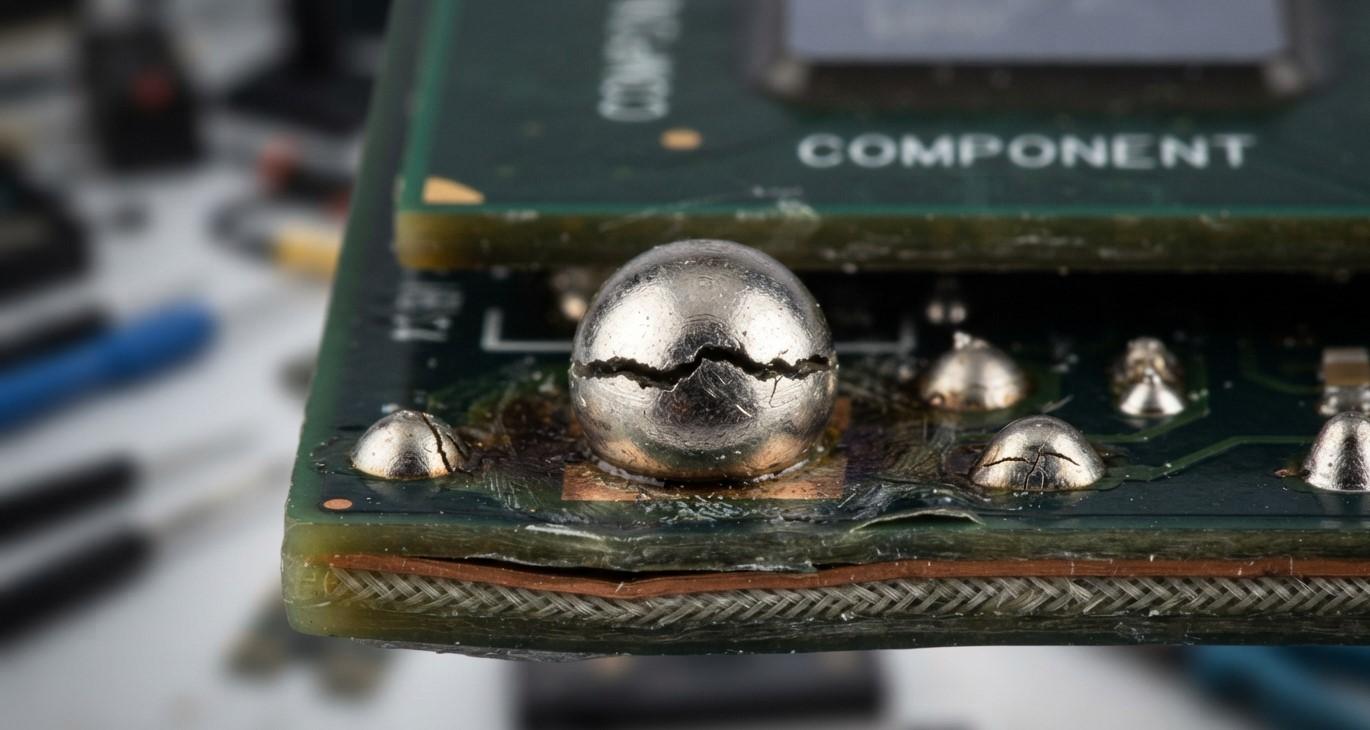
Repeated heating and cooling can gradually place stress on the delicate circuit connections inside a laptop. When internal components expand from heat and contract as they cool, solder joints, connectors, and motherboard pathways may experience repeated mechanical strain. Over time, this can contribute to intermittent hardware problems, display issues, charging failures, and unstable performance. If you are experiencing these symptoms, iPC Repair Houston can help identify the underlying hardware problem. Professional laptop screen repair Houston services can also determine whether display problems are caused by the screen itself or by internal circuitry, while screen repair Houston TX solutions can address display-related hardware concerns.
Table of Contents
- What Is Thermal Stress?
- How Heat Affects Laptop Circuit Connections
- Why Repeated Heating and Cooling Causes Problems
- Common Symptoms of Circuit Connection Damage
- Components Most Affected by Thermal Stress
- How to Reduce Thermal Stress
- When Professional Laptop Repair Is Necessary
- Final Thoughts
- FAQs
What Is Thermal Stress?
Thermal stress refers to the physical strain that develops when materials repeatedly expand and contract because of temperature changes. Inside a laptop, different materials are used together, including metals, plastics, silicon, solder, and circuit-board materials.
These materials do not always expand and contract at the same rate. During repeated heating and cooling, this difference can place stress on solder joints, component connections, and other delicate areas of the motherboard.
A single temperature cycle usually does not create a noticeable problem. However, hundreds or thousands of cycles over the lifetime of a laptop can gradually weaken certain connections.
How Heat Affects Laptop Circuit Connections
Laptop processors, graphics chips, voltage regulators, and other components generate heat during operation. Cooling fans and heat sinks are designed to move this heat away from sensitive components.
When a laptop becomes hot, internal materials expand slightly. Once the laptop cools, those materials contract again. Repeated cycles can place stress on solder joints connecting components to the motherboard.
Over an extended period, weakened connections may develop tiny cracks or lose reliable electrical contact. These problems can sometimes be difficult to identify because the connection may work normally at one temperature and become unreliable at another.
Why Repeated Heating and Cooling Causes Problems
Thermal stress becomes more concerning when a laptop regularly experiences significant temperature fluctuations.
For example, a laptop may become very warm during demanding workloads and then cool rapidly after being shut down or placed into sleep mode. Poor ventilation, blocked air vents, accumulated dust, high processor usage, and aging cooling components can increase the frequency or severity of these temperature changes.
Repeated expansion and contraction can gradually affect solder joints and other circuit connections. Eventually, a connection may become unstable enough to cause intermittent hardware behavior.
This is one reason some laptop problems appear inconsistent. A device might function properly for several hours and then suddenly freeze, restart, lose a display signal, or fail to recognize a component.
Common Symptoms of Circuit Connection Damage
Thermal-stress-related problems can produce different symptoms depending on which connection is affected. Common warning signs include:
- Random system freezes or shutdowns
- Unexpected restarts
- Display flickering or intermittent loss of video
- Failure to recognize hardware
- Charging interruptions
- Keyboard or touchpad malfunctions
- Wi-Fi or Bluetooth connectivity problems
- Performance instability during demanding tasks
- A laptop that works after cooling but fails when hot
Not every symptom indicates thermal stress. Software problems, failing components, damaged cables, and power issues can produce similar behavior. Proper diagnostics are therefore important before assuming that a circuit connection is responsible.
Components Most Affected by Thermal Stress
Several internal areas can experience stress from repeated temperature changes. The motherboard is particularly important because it contains numerous soldered components and electrical pathways.
Processors and graphics chips can also contribute to thermal stress because they generate substantial heat during intensive workloads. Their surrounding solder connections may experience repeated temperature changes.
Display-related circuitry can also be affected. If a laptop develops intermittent visual problems, professional laptop screen repair Houston services may help determine whether the issue originates from the screen itself, its cable, connector, or deeper motherboard circuitry.
Charging circuits, power-management components, memory connections, and other motherboard areas can also experience problems when excessive heat continues over a long period.
How to Reduce Thermal Stress
Preventing excessive heat is one of the best ways to reduce long-term thermal stress.
Keep the laptop's ventilation openings clear and avoid using it on soft surfaces such as beds, blankets, or thick cushions. These surfaces can restrict airflow and make it harder for the cooling system to remove heat.
Regular cleaning can also help prevent dust from accumulating around fans and vents. Users should avoid consistently pushing a laptop beyond its intended workload, especially when the cooling system is already struggling.
Monitoring unusual heat, fan behavior, and performance changes can provide useful early warnings. If a laptop becomes unusually hot even during normal use, it may need professional inspection.
When Professional Laptop Repair Is Necessary
Circuit connection problems can be challenging to diagnose because they may occur intermittently. Simply replacing a visible component may not solve the underlying issue if the real problem is a damaged connection or motherboard-level fault.
Professional technicians can inspect the laptop's cooling system, motherboard, connectors, cables, and other hardware to determine where the problem originates.
For customers looking for screen repair Houston TX, a professional inspection can also help distinguish between a damaged display panel and an underlying circuit or connection problem. This distinction matters because replacing the screen will not necessarily resolve a motherboard-related fault.
A qualified repair provider such as iPC Repair Houston can help assess hardware symptoms and determine whether repair, component replacement, or additional diagnostics are appropriate.
Final Thoughts
Repeated thermal stress may seem harmless because each individual heating and cooling cycle produces only a small amount of expansion and contraction. However, over a laptop's lifetime, thousands of cycles can place ongoing mechanical strain on solder joints and circuit connections. If you notice overheating, display instability, charging problems, or other unusual hardware behavior, iPC Repair Houston can help investigate the underlying issue. For display-related concerns, laptop screen repair Houston services can help determine whether the problem involves the panel, cable, or internal circuitry, while screen repair Houston TX support can provide professional assistance when display hardware needs attention.
Taking action early can help prevent a minor connection problem from developing into a more serious hardware failure. Maintaining proper airflow, keeping the cooling system clean, and seeking professional diagnostics when symptoms persist are important steps toward maintaining reliable laptop performance.
- Technology for Students
- Admissions & Applications
- Online Courses
- Career and Jobs
- Campus Life
- Drinks
- Film
- Fitness
- Food
- Jogos
- Gardening
- Health
- Início
- Literature
- Music
- Networking For Students
- Insights
- Party
- Religion
- Shopping
- Sports
- Theater
- Wellness
- Education News
- Business & Finance For Students
- Security, Law & Crime Education
- Insurance
- Science & Technology For Students
 Portuguese (Brazil)
 English
 Arabic
 French
 Spanish
 Portuguese
 Deutsch
 Turkish
 Dutch
Dutch
 Italiano
 Russian
 Romaian
 Greek
Greek